
DevLake Plugin (Beta)
Sync Git AI's pull request AI-attribution and cost metrics into Apache DevLake and build Grafana dashboards on top of them.
The DevLake plugin is currently in beta. It works end-to-end, but the schema and setup steps may change between releases. Report issues at git-ai-project/devlake-integration.
The gitai plugin for Apache DevLake syncs pull
request AI-attribution and cost metrics from the Git AI Public Analytics API
into your DevLake instance, so AI authorship shows up next to the DORA and
engineering metrics you already track — and you can chart it in DevLake's
bundled Grafana.
It is a Python remote plugin built on pydevlake, and it is deliberately
tool-layer only: rows land in a _tool_gitai_pull_requests table and
nothing is written to DevLake's shared domain pull_requests table. Your
GitHub/GitLab plugin data stays untouched — you join against it in dashboards:
SELECT dpr.*, g.percent_ai, g.ai_lines, g.human_lines,
       g.primary_agent, g.primary_model, g.estimated_cost_usd
FROM pull_requests dpr
JOIN repos r ON dpr.base_repo_id = r.id
JOIN _tool_gitai_pull_requests g
  ON g.repo_url = r.url AND g.number = dpr.pull_request_key
The plugin lives at
github.com/git-ai-project/devlake-integration,
alongside a reference docker-compose setup and the starter Grafana
dashboard:
git clone https://github.com/git-ai-project/devlake-integration.gitThe plugin itself is the plugins/gitai/ directory — the plugin package,
run.sh, and pyproject.toml.
What data you get
One row per pull request in _tool_gitai_pull_requests, keyed by
(repo_url, number):
| Group | Columns |
|---|---|
| PR metadata | repo_url, number, repo_domain, repo_org, repo_name, title, state, opened_at, merged_at, closed_at, opener_user_id, opener_display_name, opener_email, commit_count |
| AI attribution | ai_aided, percent_ai, ai_lines, human_lines, unknown_lines, other_lines, git_lines_added, git_lines_deleted, primary_agent, primary_model, authorship |
| Cost & tokens | session_count, input_tokens, output_tokens, cached_read_tokens, cached_write_tokens, reasoning_tokens, total_tokens, estimated_cost_usd, sessions_with_cost, cost_completeness |
Two things to keep in mind when writing queries:
percent_aiis a 0–1 fraction, not 0–100. Multiply by 100 for display.- Filter where it matters:
authorship = 1(a boolean — true means the PR has attribution data) for attribution metrics,estimated_cost_usd > 0for cost metrics. PRs from before Git AI was installed will have neither.
Syncs are incremental — each run only fetches PRs updated since the previous run for that repo, so recurring blueprints stay fast.
Install the plugin
DevLake discovers Python plugins by scanning REMOTE_PLUGIN_DIR
(/app/python/plugins in the official images) for */run.sh at server
startup. The official apache/devlake image already ships everything the
plugin needs (pydevlake, uv.sh, Python 3.9), so installing is just getting
the gitai/ directory into that path — no code changes, no DevLake fork.
Pick one of the two approaches below.
Option A: add a layer to your Docker image
Best for production — the plugin becomes part of an immutable image you can tag, push, and roll back.
From a checkout of the devlake-integration repo, add a Dockerfile:
FROM devlake.docker.scarf.sh/apache/devlake:v1.0.3-beta15

COPY plugins/gitai /app/python/plugins/gitai
Build it and point your docker-compose.yml at the new image:
docker build -t devlake-gitai:v1.0.3-beta15 .services:
devlake:
image: devlake-gitai:v1.0.3-beta15
# ...rest unchangedOption B: copy the raw plugin into an existing deployment
Best for trying it out — copy the directory straight into the running container and restart so DevLake re-scans its plugin directory:
docker cp plugins/gitai <devlake-container>:/app/python/plugins/gitai
docker restart <devlake-container>
docker cp doesn't survive the container being recreated (e.g. on image
upgrade). To make it stick without building an image, bind-mount the
directory in a compose override instead:
# docker-compose.override.yml
services:
  devlake:
    volumes:
      - ./plugins/gitai:/app/python/plugins/gitai
docker compose up -d devlakeFirst startup
On first use the plugin builds its own virtualenv inside the plugin directory
using uv — the container needs outbound network access to PyPI for that one
build.
The plugin ships database migrations (it creates its _tool_gitai_* tables).
If DevLake's API starts answering 428 Precondition Required after the
restart, confirm the migration:
curl http://localhost:8080/proceed-db-migrationThen verify DevLake picked the plugin up:
curl http://localhost:8080/plugins | grep gitaiConnect it to Git AI
You'll need a Git AI API key — create one in the Git AI dashboard under Settings → API Keys (see Authentication).
DevLake's config-ui hardcodes its plugin catalog, so gitai won't appear on
the Connections page. Everything works through DevLake's REST API instead
(http://localhost:8080 below — adjust for your deployment), and once a repo
is attached, the plugin does show up in the blueprint UI.
1. Create and test a connection
curl -X POST localhost:8080/plugins/gitai/connections \
  -H 'Content-Type: application/json' \
  -d '{"name":"gitai","endpoint":"https://usegitai.com/api/v1","token":"<YOUR API KEY>"}'

curl -X POST localhost:8080/plugins/gitai/connections/1/test -d '{}'
Self-hosted Git AI deployments can set GITAI_ENDPOINT on the devlake
container to change the default endpoint for all gitai connections
(a per-connection endpoint still overrides it).
2. Browse and attach repos
Scope groups are {domain}/{org} pairs; scopes are repos, identified by repo
URL:
# List orgs visible to your API key
curl 'localhost:8080/plugins/gitai/connections/1/remote-scopes'

# List repos in one org
curl 'localhost:8080/plugins/gitai/connections/1/remote-scopes?groupId=github.com/<org>'

# Create a scope config, then attach repos
curl -X POST localhost:8080/plugins/gitai/connections/1/scope-configs \
  -H 'Content-Type: application/json' \
  -d '{"name":"default","entities":["CODE"]}'

curl -X PUT localhost:8080/plugins/gitai/connections/1/scopes \
  -H 'Content-Type: application/json' \
  -d '{"data":[{"id":"<repo url>","name":"<org/name>","url":"<repo url>","domain":"github.com","org":"<org>","repoName":"<name>","scopeConfigId":1}]}'
3. Add it to a project blueprint and run
Attach the connection to the DevLake project that already collects the same repos from GitHub/GitLab, so the tool table has domain PRs to join against:
curl -X PATCH localhost:8080/blueprints/<id> \
  -H 'Content-Type: application/json' \
  -d '{"connections":[{"pluginName":"gitai","connectionId":1,"scopes":[{"scopeId":"<repo url>"}]}]}'

curl -X POST localhost:8080/blueprints/<id>/trigger \
  -d '{"skipCollectors":false,"fullSync":false}'
When the pipeline finishes, _tool_gitai_pull_requests is populated. From
here on, the blueprint's normal schedule keeps it in sync incrementally.
Set up a dashboard
DevLake ships Grafana pre-wired to its database (the grafana service in the
standard compose file, mysql datasource), so Git AI panels live alongside
your DORA dashboards.
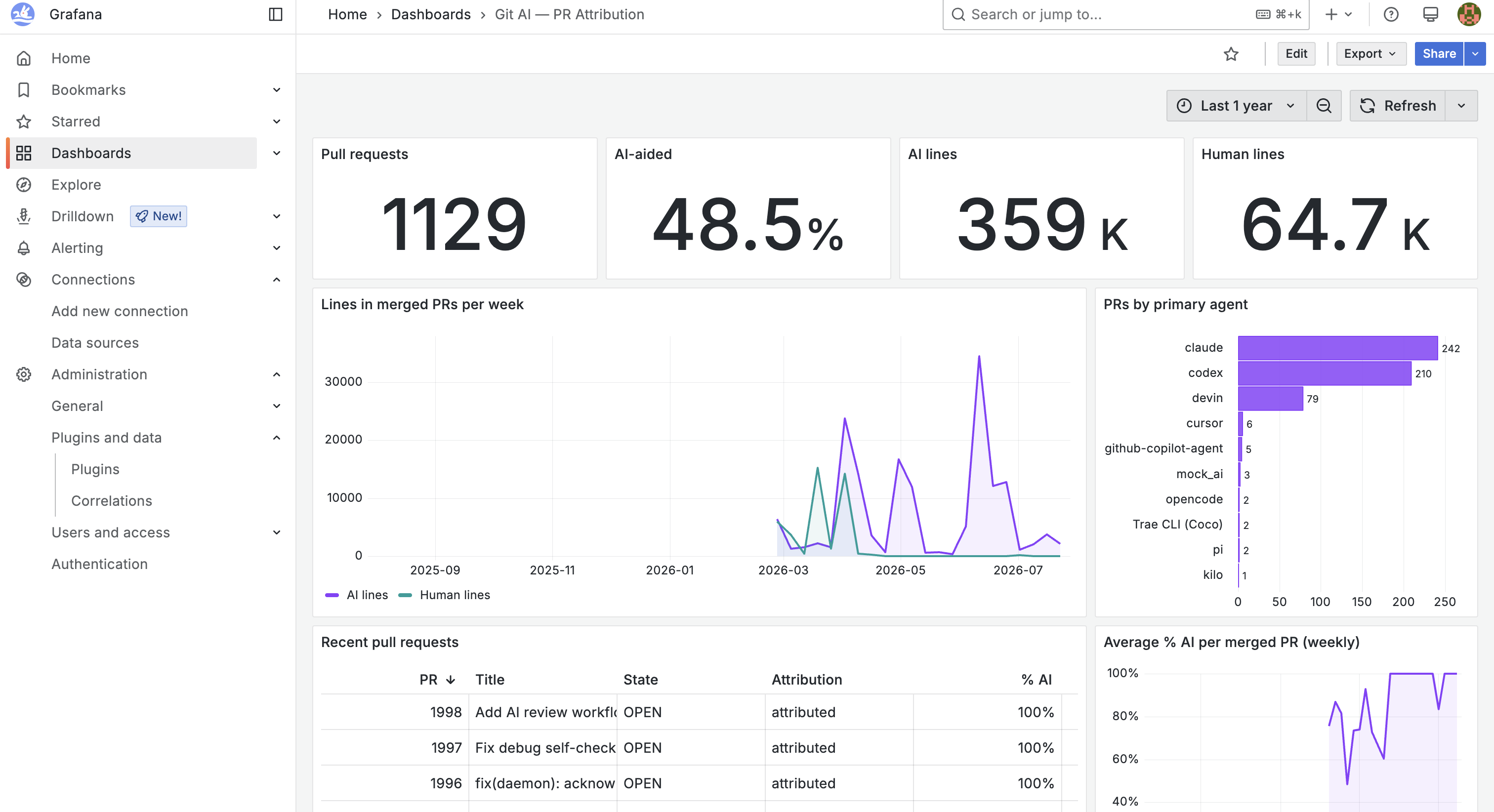
The dashboard above is built entirely from _tool_gitai_pull_requests —
top-line stats, AI vs. human lines per week, a PR breakdown by primary agent,
and a recent-PRs table with per-PR attribution.
Import the starter dashboard
Grab
grafana-gitai-stats.json
from the repo, then in Grafana go to Dashboards → New → Import, upload the
file, and pick the mysql datasource. You get five panels out of the box: mean and median
% AI across attributed PRs, mean and median cost per PR, and a
coverage stat showing how many PRs have attribution and cost data at all.
Build your own panels
Add panels with SQL queries against _tool_gitai_pull_requests, joining to
DevLake's domain tables when you want to slice by anything the GitHub/GitLab
plugins collect (labels, reviewers, cycle time, and so on). Some starting
points:
Average % AI per repo:
SELECT repo_name,
       100 * AVG(percent_ai) AS "% AI",
       COUNT(*)              AS "PRs"
FROM _tool_gitai_pull_requests
WHERE authorship = 1
GROUP BY repo_name
ORDER BY 2 DESC
% AI over time (by month merged):
SELECT DATE_FORMAT(merged_at, '%Y-%m') AS month,
       100 * AVG(percent_ai)           AS "% AI"
FROM _tool_gitai_pull_requests
WHERE merged_at IS NOT NULL
  AND authorship = 1
GROUP BY 1
ORDER BY 1
Agent spend vs. cycle time (joined with domain PRs):
SELECT g.primary_agent                                        AS agent,
       AVG(g.estimated_cost_usd)                              AS "Cost per PR",
       AVG(TIMESTAMPDIFF(HOUR, dpr.created_date, dpr.merged_date)) AS "Hours to merge"
FROM pull_requests dpr
JOIN repos r ON dpr.base_repo_id = r.id
JOIN _tool_gitai_pull_requests g
  ON g.repo_url = r.url AND g.number = dpr.pull_request_key
WHERE g.estimated_cost_usd > 0 AND dpr.merged_date IS NOT NULL
GROUP BY 1